In today’s digital landscape, ransomware stands out as a particularly menacing adversary. This guide will share practical strategies to not only prevent ransomware attacks, but also mitigate the impact of ransomware attacks.
Understanding ransomware
Ransomware is a type of malware that encrypts your files, making them and the systems that depend on them completely unusable. The malicious actors behind these attacks then demand a ransom in exchange for the decryption key. Over time, these malicious actors have adapted their ransomware techniques to become even more destructive and impactful.
They’ve started stealing victim data and threatening to expose it if the ransom isn’t paid. This combination of tactics is commonly referred to as “double extortion.” In some cases, they may even choose to solely focus on exfiltrating data and threatening to release it, without employing traditional ransomware methods.
The stakes – why ransomware prevention matters
These ransomware attacks and data breaches can have a major impact on your business. They can disrupt critical operations, leaving you unable to access necessary data to operate. And the economic and reputational consequences of ransomware attacks and data extortion can be devastating for businesses of all sizes, both during the initial disruption and, at times, the often-lengthy recovery process.
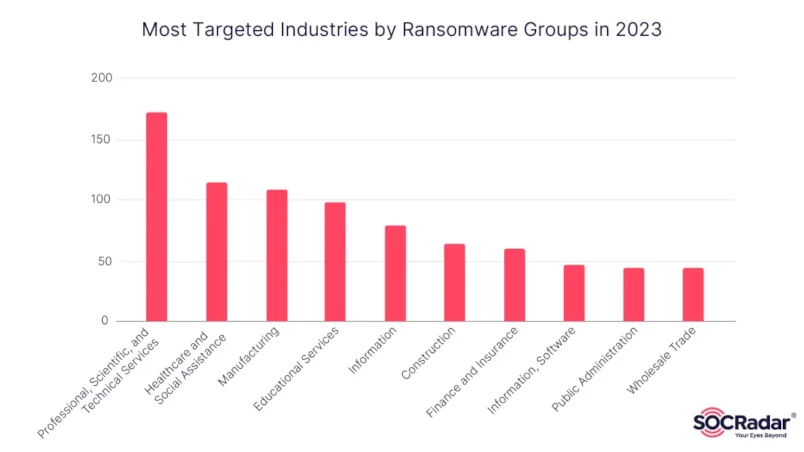
So, what can you do to protect your organisation? Let’s dive into some practical steps.
Steps for ransomware prevention
1. Keep software updated
Regularly patching and updating software and operating systems to their latest versions is a fundamental defence against ransomware. It closes security vulnerabilities, mitigates emerging threats, and reduces the attack surface that ransomware can exploit. Make sure critical security updates get installed quickly – especially on any internet-facing servers running software that processes online data, like web browsers or document readers. By making patch management a priority, organisations can significantly strengthen their defences against ransomware and other cyber threats.
2. Employee training and awareness
An essential aspect of preventing ransomware is ensuring that your team is well-informed and vigilant. Educated staff can better identify threats, follow security best practices, and respond appropriately to mitigate the impact of a ransomware attack. Implement regular cybersecurity user awareness and training programs to foster a culture of security awareness. By keeping the workforce informed about the latest threats and attack vectors, you empower them to act as the first line of defence against potential breaches.
3. Backup your data – Keep offline, encrypted backups
It is crucial to keep offline, encrypted backups of critical data and regularly test the accessibility and reliability of backups in case of a disaster recovery situation. Maintaining regular backups allows you to restore your data and systems without having to pay the ransom. Backups provide a way to recover encrypted or locked files, minimising the disruption and damage caused by ransomware. Test backups regularly to ensure they’re accessible and can be reliably used to minimise disruption in the event of a ransomware attack. Ransomware attackers often try to delete or encrypt any backups they can find, making them unusable for restoration, so keeping them offline is key.
4. Conduct regular vulnerability scanning
Conduct regular vulnerability scanning to identify and address weaknesses, especially those on internet-facing devices, to limit the attack surface. By regularly scanning for and addressing vulnerabilities, you can close potential entry points before attackers can leverage them. This helps you stay ahead of evolving threats, ensuring any security gaps are promptly identified and mitigated before they can be exploited.
5. Implement Zero Trust Access Control
Treat every user and device as untrusted until proven otherwise. Implement a zero trust architecture to prevent unauthorised access to data and services. Zero Trust assumes that all users, devices, and applications are untrusted by default, and verifies their identity and authorisation before granting them to access data, applications, or other critical systems. This proactive measure helps mitigate the risk of ransomware spreading laterally within a network, as it becomes much harder for cyber attackers to move freely between secured resources. This is also critically important for key management resources in the cloud.

By continuously validating access to sensitive areas, a Zero Trust access control model reduces the potential attack surface and limits the damage a ransomware infection could cause.
6. Implementing strong forms of MFA for all services
Activating a strong Multi-factor authentication (MFA) is one of the best ways that businesses can protect their internet facing business accounts from ransomware related threats. Login credentials are often compromised through phishing attacks where ransomware actors may send fraudulent emails or messages that trick users into revealing their usernames and passwords, or through data breaches where employees reuse the same login details. Using MFA protects accounts more than just using a username and password. MFA adds an extra layer of protection by requiring users to provide multiple forms of identification before accessing sensitive data or systems. This helps prevent access even if login credentials, such as their usernames and passwords, are compromised, and makes it much harder for ransomware actors to spread through the network or gain higher levels of access.
There are strong forms of MFA and weak forms of MFA. Avoid weaker forms like SMS or push notifications, as these can be suspectable to mobile push bombardment and SMS-based attacks. Opt for phishing-resistant options like FIDO2 and WebAuthn and Time-based One-time Password (TOTP) MFA. Implement these Strong Forms of MFA for all services, particularly for email, VPNs, and accounts that access critical systems.
7. Change default admin credentials and implement strong password policies
Change default admin usernames and passwords and implement strong password policies that require unique passwords of at least 15 characters (inclusion of numbers, special characters, and case sensitivity). Many network devices, servers, or software applications come with default administrator usernames like “admin” and common default passwords like “password” or the manufacturer’s name. Default admin credentials are well-known and easily exploited by ransomware actors. These default usernames and passwords are widely published and commonly used, providing an easy entry point for attackers if they are not promptly changed.
Use password managers to develop and manage secure, unique passwords. Secure and limit access to any password managers in use and enable all security features available on the product in use, such as MFA.
Passwords should be stored in a secured database and use strong hashing algorithms. Educate your team on proper password hygiene, like not reusing passwords or saving them in local files. You can disable saving passwords to the browser such as through Group Policy Management consoles.
Note: Thankfully, the UK has taken significant steps to prevent the use of default passwords. In April 2024, the UK became the first country in the world to ban default usernames and passwords from these IoT devices. A new version of the 2022 Product Security and Telecommunications Infrastructure Act (PTSI) is now in effect which requires manufactures of IoT devices to not supply devices that use guessable default usernames and passwords. But while this law is a significant step in improving the security of consumer IoT devices, it’s important to note that it doesn’t address all types of devices or software that might use default credentials. Organisations and individuals should still be vigilant about changing default passwords on any network devices, servers, or software applications not covered by this specific legislation.
8. Email security
Email is a prime entry point for ransomware, so it is critical to implement robust email security measures and filters to screen out malicious messages. Ransomware actors may send phishing emails that appears to be from a trusted source, such as a company executive or IT support. The email may contain a malicious link or attachment that, when clicked, downloads and installs ransomware onto the victim’s system.
Email filters should target emails with known malicious subject lines, and block suspicious Internet Protocol (IP) addresses at the firewall. You should also enable attachment filters to restrict file types that commonly contain malware and should not be sent by email.
Secure Email Gateway as a Gatekeeper
A secure email gateway acts as a gatekeeper, scanning incoming and outgoing emails for threats and applying appropriate security policies. These solutions use advanced techniques such as machine learning and sandboxing to detect and block malicious content, while allowing legitimate emails to pass through. Secure email gateways can also enforce content policies, such as blocking sensitive information or enforcing encryption requirements, to ensure that email communications align with organisational security and compliance standards.
Implement DMARC and SPF
DMARC (Domain-based Message Authentication, Reporting & Conformance) and SPF (Sender Policy Framework) are email authentication protocols that help prevent email spoofing and phishing attacks by verifying the authenticity of the sender’s domain. DMARC allows domain owners to specify how their domain should be handled by receiving mail servers, while SPF defines which IP addresses are authorised to send email on behalf.
Note though, DMARC protects your domain from being spoofed but does not protect from incoming emails that have been spoofed unless the sending domain also implements DMARC.
External Email Warnings
Flagging external emails in email clients to alert users of emails from senders outside your organisations is a simple yet effective measure (sometimes known as Native External Email Warnings). This is achieved by presenting a new tag on emails called “External” and exposing related user interface at the top of the message reading view to see and verify the real sender’s email address when the email came from outside your organisation.

By implementing these email security measures, businesses can significantly reduce the risk of potential cyber threats and safeguard their systems and networks.
9. Use reliable antivirus and anti-malware software
Quality antivirus and anti-malware solutions can detect and block known ransomware signatures, preventing the malware from infecting systems in the first place. Enabling automatic updates for antivirus and anti-malware software and signatures is a proactive measure against emerging threats. Ensure tools are properly configured to escalate warnings and indicators to notify security personnel. An intrusion detection system (IDS) can also help identify any suspicious network activity before ransomware strikes. By having a reliable antivirus and anti-malware solution in place, organisations can significantly reduce the risk of a successful ransomware attack and improve their overall cyber security posture.
Conclusion
Preventing ransomware is an ongoing commitment that requires a multi-faceted approach. By combining these strategies, you can create a robust defence against evolving threats. It is essential to share this knowledge, foster a culture of cybersecurity, and collectively strengthen our digital defences. Remember, a secure digital future starts with prevention.